
How We Built an Automated LinkedIn Content Engine
Executive Summary
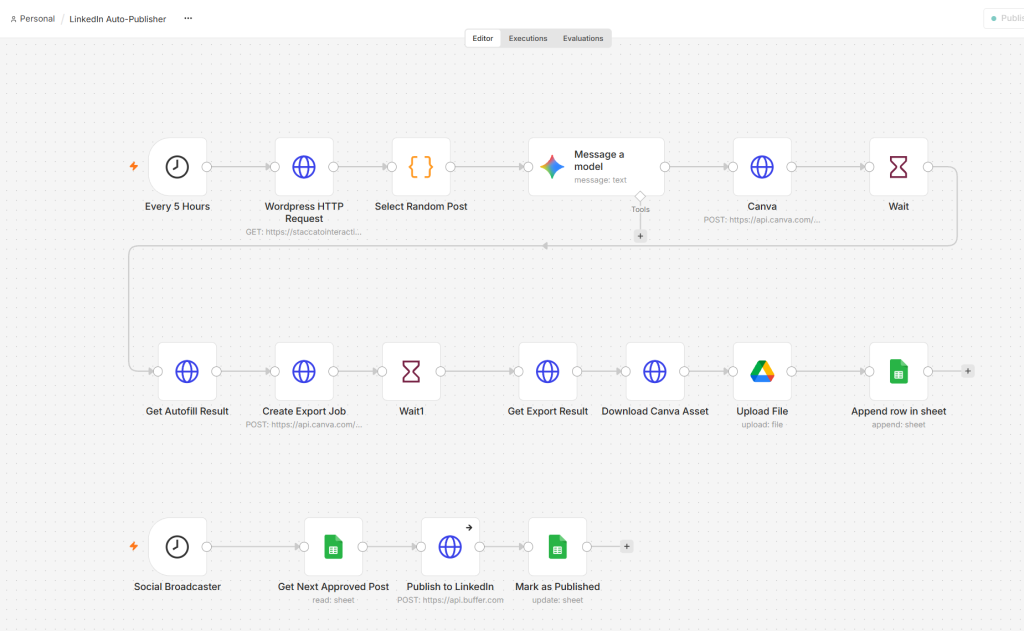
Most marketing teams sit on dozens of high-value, long-form articles that get promoted once and forgotten. We engineered an end-to-end, two-stage event-driven pipeline in n8n that queries your WordPress archive, generates high-converting LinkedIn hooks using an LLM, renders on-brand social graphics via the Canva Autofill API, persists assets permanently in Google Drive, and stages them in a Google Sheets review queue for automated Buffer distribution.
The Challenge: Content Decay and Manual Graphic Bottlenecks
Producing long-form B2B content requires significant investment in domain research, technical drafting, and editorial review. However, repurposing that content for social distribution often stalls because of two operational friction points:
- Repetitive Creative Generation: Copywriters and designers have to re-read older articles, write punchy platform-specific hooks, and manually clone Canva templates to insert dynamic text.
- Ephemeral API Assets: Graphic automation tools (such as Canva’s Autofill & Export API) host generated media on temporary, pre-signed Amazon S3 buckets. If you store these raw URLs directly in a spreadsheet queue, the links expire within hours or days, causing <code>AccessDenied (Request has expired)</code> errors right when your scheduler attempts to publish.
To solve this, we decoupled content generation from content broadcasting, inserting an automated persistence layer that guarantees zero link degradation.
Architecture Breakdown: The Two-Stage n8n Pipeline
Stage 1: The AI Content Generator & Asset Pipeline
- Trigger (`Every 5 Hours`):
Initiates a scheduled run to fetch and prepare an upcoming campaign asset. - Extraction (`Wordpress HTTP Request` + `Select Random Post`):
Queries the WordPress REST API (`/wp-json/wp/v2/posts`) to pull published technical articles, parsing title, permalink, and raw body copy. - Cognitive Processing (`Message a model`):
Prompts an LLM to extract the core insight and return a structured JSON payload containing a LinkedIn hook (`hook`) and short-form post copy (`copy`). - Asynchronous Graphic Rendering (`Canva API` / `Wait` / `Get Autofill Result` / `Create Export Job` / `Get Export Result`):
- Calls Canva’s Autofill API to populate brand templates dynamically with the article’s title and generated hook.
- Polls the export job until Canva completes rendering the graphic.
- Persistent Ingestion (`Download Canva Asset` + `Upload File`):
- Downloads the binary asset directly via an HTTP `GET` request.
- Streams the image into a designated Google Drive repository (`/n8n/Staccato LinkedIn Images`), generating a permanent `webViewLink`.
- Queue Ingestion (`Append row in sheet`):
Writes the publication date, article title, post hook, copy, status (`Draft`), and the permanent Google Drive URL into our `Content Queue` Google Sheet.
Stage 2: The Social Broadcaster (Human-in-the-Loop Delivery)
**Trigger (`Social Broadcaster`)**: Runs on a distinct editorial cadence.
* **State Check (`Get Next Approved Post`)**: Scans the Google Sheet queue for items marked `Approved` by an editor.
* **Publishing Engine (`Publish to LinkedIn` via Buffer API)**: Sends the approved copy and attached graphic URL directly to LinkedIn via Buffer.
* **State Update (`Mark as Published`)**: Updates the Google Sheet row status to `Published`, providing a complete audit trail.
Technical Edge Cases We Solved
- Solving Ephemeral Canva URLs
Canva API export URLs are signed AWS S3 links with finite validity windows (`X-Amz-Expires`). To prevent dead assets, our workflow downloads the raw image buffer in n8n and pushes it directly to cloud storage before the row is created in Google Sheets. - Service Account vs. Personal Drive Storage Quotas
Google Drive Service Accounts possess **0 bytes of independent storage quota**, returning a `403 Forbidden: storageQuotaExceeded` error when writing to personal Drives even if the folder is shared with “Editor” access. We circumvented this by configuring an OAuth 2.0 Web Client credential tied directly to a dedicated organization account (`staccatointeractive@gmail.com`), allowing the automation to write directly into Google Drive storage without administrative blocks.
How Clients Benefit from This Architecture
Implementing this custom MarTech automation delivers immediate operational and commercial returns:
- Maximized Content ROI:
Systematically resurfaces evergreen blog posts, whitepapers, and case studies, extracting ongoing pipeline value from existing assets. - Zero Designer Overhead:
Brand design templates are preserved and automatically populated. Creative teams configure the design system once; the automation executes at scale. - Editorial Oversight Without Bottlenecks:
The Google Sheets staging queue provides a low-friction “Human-in-the-Loop” review step. Marketing leads retain final sign-off before anything goes live. - Decoupled Architecture:
Because the generation and broadcast layers are independent, you can switch schedulers (Buffer, Hootsuite, Sprout Social, or native LinkedIn APIs) without rewriting the creative generation logic.